
MLB Ballpark
MLB Advanced Media, L.P.Sports
4.112.90K Reviews
- Version
- 15.8.1
- Installs
- 10.00M
- Age Rating
- Everyone
Screenshots
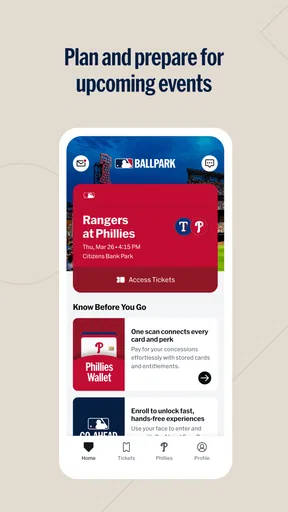
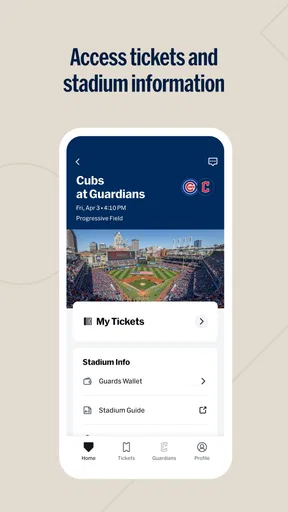
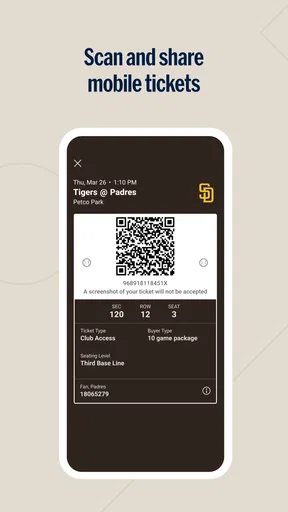
Our Review of MLB Ballpark
 Analysis by Appyee
If you are heading to a Major League Baseball game, MLB Ballpark is the app I would install before leaving home. It is a free sports app from MLB Advanced Media, L.P., designed around the practical side of visiting a ballpark rather than trying to replace every baseball app on your phone. In my experience, its value appears most clearly when I am already planning a trip, walking toward the stadium, or trying to keep game-day information in one place.
The app has been available since Apr 2, 2012, and its long presence is reflected in its broad audience: it has passed 10 million installs, with a 4.1 average from around 212 thousand ratings and roughly 13 thousand written reviews. Those figures suggest a well-established companion for fans, although they also hint at an important distinction: this is most useful when baseball becomes a real-world outing, not necessarily when I only want scores or general league news.
What I found when using it as a ballpark companion
I use MLB Ballpark as a game-day reference rather than something to browse constantly. In this section, I’ll focus on the simple routine that makes a venue-specific app useful: checking what matters before I leave, keeping the essentials easy to reach, and avoiding rushed decisions at the gate. That baseline also makes it easier to judge which settings are worth adjusting.
A useful layer between planning and arriving
The main idea is simple, but the execution matters. MLB Ballpark focuses on the experience of being at a Major League Baseball venue. That gives it a different purpose from a general sports-score app, a team news feed, or a ticket marketplace. I see it as a digital trip organizer for the stadium itself: the kind of app I open before the game, check again near the entrance, and keep available while moving around the venue.
That focus makes the app easier to understand than many sports apps that try to cover every possible fan need. Instead of making me sift through unrelated league content, the ballpark context is central. For a first-time visitor, that can reduce the amount of guesswork involved in preparing for the day. For a regular attendee, it can serve as a repeatable starting point for checking the details connected with a particular visit.
The trade-off is equally clear. If I want deep statistical analysis, a constant stream of team reporting, fantasy tools, or a broad view of several sports, I would choose a different app. MLB Ballpark is not compelling because it does everything; it is compelling because it addresses a specific situation that ordinary baseball apps often treat as secondary.
Why trust matters more on game day
A ballpark app is handling information at a moment when mistakes are especially inconvenient. I may be standing in a crowded concourse, trying to find the right entrance, checking something while my phone battery is under pressure, or making a decision with family members waiting beside me. That makes visible controls and clear user choices more important than flashy presentation.
My approach with any app used in that setting is cautious. I look at what the app asks me to do, which account choices are presented, and whether I can understand the difference between an essential step and an optional one. MLB Ballpark should be treated as a practical tool, not as something that deserves automatic access to every part of my digital life simply because it is official.
The developer is MLB Advanced Media, L.P., which gives the app a direct connection to the Major League Baseball ecosystem. That identity is useful when I am deciding whether an app belongs to the event I am attending, but it does not remove the need to read prompts carefully. Official branding can establish context; it should not replace my own review of permissions, account settings, and data choices.
Account choices deserve a deliberate look
Some people will want to use the app only as a quick reference, while others may prefer a more connected experience around their baseball visits. Those are different privacy and convenience decisions. I recommend starting with the least information necessary for the task in front of me, then adding account details only when a specific feature makes that worthwhile.
This is also a good habit when several people share one phone or when a parent is helping a child navigate a game day. The app carries an Everyone content rating, but that rating describes the suitability of the content, not a promise that every account or data decision is equally appropriate for every household. I would still check the visible choices myself before handing the phone to someone else.
One practical tip is to avoid making account changes while standing in a queue. I would review sign-in options, notifications, and any permission request at home, where I have time to read the wording. At the stadium, convenience can make people accept prompts without thinking. Preparing beforehand keeps the app in a supporting role instead of letting it dictate the pace of the visit.
Where the app can save real effort
My favorite use case is a day when the baseball game is only one part of a larger outing. Imagine taking public transport with two friends, arriving earlier than planned, and needing to orient yourself before meeting another group inside. A ballpark-focused app is more useful in that moment than a generic score screen because the question is not simply who is winning. The question is how to manage the visit around the venue.
Another realistic scenario is attending a stadium I have never visited. I might have the ticket information in one place, messages from friends in another, and team updates somewhere else. Keeping the ballpark companion available gives me a dedicated reference point. I would still save important ticket details separately and keep a backup plan, but the app can reduce the number of unrelated searches I make during a crowded arrival.
For frequent visitors, the benefit is less about discovery and more about routine. I can use the same preparation pattern before each game: check the relevant ballpark information, review the app’s current prompts, decide which notifications are useful, and then put the phone away. That last step matters. A good companion should help me spend more time watching baseball, not encourage constant screen checking.
Three less obvious habits that improve the experience
First, I would open the app before leaving rather than waiting until I reach the gates. This is not just about convenience. It gives me time to notice whether I need to sign in, update the app, or respond to a permission request. It also lets me compare what the app shows with my ticket, travel plan, and messages before the surroundings become noisy and rushed.
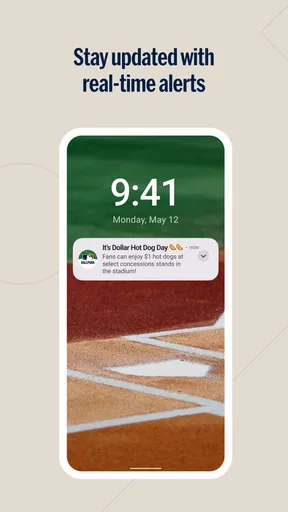
Second, I would treat notifications as a selective tool. Game-day alerts can be useful, but too many interruptions can make the app feel intrusive. I prefer enabling only the notices that help with my actual visit and reviewing the choices again after the game. If an alert does not change what I need to do, it probably does not deserve permanent attention.
Third, I would keep a simple offline backup for the essentials. I might save the ticket information I need, note the meeting point, and remember the route home. This is not a criticism specific to MLB Ballpark; it is sensible preparation for any app used in a crowded venue. A companion app should reduce friction, but my entire game-day plan should not collapse if connectivity, battery life, or sign-in access becomes awkward.
Permissions and data-sensitive moments
The most important trust test happens when the app asks for access beyond the basic information I expected. I do not assume that every request is necessary just because it appears during a stadium visit. I read the explanation, consider whether the feature is relevant to me, and decline anything that does not serve a clear purpose. If the app still works without a permission, I prefer to keep that permission off until I have a reason to use it.
Location-related choices deserve particular attention in a ballpark setting. A venue companion may feel more useful when it knows where I am, but I would decide whether that convenience is worth the access and whether the setting can be limited. The same principle applies to notifications and account information: I want a visible choice, a clear benefit, and the ability to change my mind later.
I also avoid entering personal information simply to make the app feel more complete. If I am only checking stadium information for one visit, I ask myself whether a permanent account connection is genuinely useful. If I attend games regularly, the answer may be different. The right choice depends on how often I use the app and how comfortable I am with maintaining another sports-related account.
My advice is to revisit these decisions after the event. Temporary enthusiasm can lead to settings that remain active long after the game. A quick review of notifications, location access, and account preferences helps keep the app aligned with how I actually use it. That is a small step, but it gives me more control than accepting every default and forgetting about it.
How it compares with ordinary sports alternatives
A general sports app is usually better for checking scores across leagues, following several teams, reading broader news, or comparing live statistics. Those apps are built for ongoing sports consumption. MLB Ballpark has a narrower advantage: it is oriented toward the physical experience of visiting a Major League Baseball venue.
A team-specific app may be the better choice if my main interest is one club’s news, roster updates, or season-long coverage. A ticket-focused service may be preferable when my only task is buying, storing, or transferring tickets. I would not install MLB Ballpark expecting it to replace all of those tools. I would install it when the stadium visit itself is the priority.
That distinction also explains why the app may feel unnecessary to a fan watching from home. If I rarely attend games, already have a reliable way to manage tickets, and only need live scores, another sports app could offer more value with fewer moving parts. The strongest case for MLB Ballpark is situational rather than universal.
Performance expectations and practical friction
The app is free, which removes the biggest barrier to trying it before a game. It currently lists version 15.8.1 and requires an operating system version of 11 or later. I would check compatibility before the day of the event, especially if I use an older phone. Installing or updating at home is safer than discovering a compatibility problem outside the stadium.
The free price is convenient, but it does not mean the app is frictionless in every situation. A user may still encounter sign-in steps, permission decisions, notifications, or dependence on a reliable connection. Those are ordinary concerns for a connected stadium tool, yet they matter more when time is limited. I would not make it my only source for essential access information.
Another limitation is its narrow purpose. The app’s focus is an advantage when I am attending a game, but it can make the experience feel less useful between visits. I would not keep opening it out of habit if I had no upcoming ballpark need. Its best role is a prepared companion that I use deliberately, not a background app that demands daily attention.
Who should use it and who should skip it
I recommend MLB Ballpark to fans attending a Major League Baseball game, especially first-time visitors, people organizing group outings, and anyone who wants one venue-focused place to begin preparing. It is also a sensible download for travelers visiting an unfamiliar stadium, provided they review the app’s prompts and keep their core travel details backed up elsewhere.
I would be more hesitant to recommend it to someone who only wants scores, standings, or general baseball news. That person may get more from a broader sports service. I would also skip it if my phone cannot meet the minimum operating-system requirement, if I strongly prefer not to create another account, or if I already have a trusted event workflow that covers everything I need without an additional app.
Families should decide together how much access and notification activity they want. The Everyone rating makes the app broadly suitable from a content perspective, but adults should still guide account and permission choices. For a shared device, I would use the app with the same care I apply to any service connected to a real-world outing.
My cautious verdict
MLB Ballpark earns its place on my phone when I have a game to attend. Its strength is not endless content; it is the way a baseball visit becomes the center of the experience. I find it more purposeful than a generic sports app during the hours around a game, and its free availability makes it easy to test without committing money.
My recommendation comes with boundaries. I would install it early, check the required operating-system version, review account and permission choices at home, limit notifications to useful ones, and keep essential ticket or travel information available through another method. Those habits make the app more reliable without asking me to surrender control for convenience.
With a 4.1 average and a large installed audience, it is clearly a familiar choice among baseball fans, but popularity alone is not the reason I would use it. I would choose it because it addresses a specific problem: making a Major League Baseball ballpark visit easier to organize. If that is the problem you have, this is a focused and worthwhile free companion. If you only need everyday scores or broad sports coverage, I would choose a different tool and leave this one for the next trip to the stadium.
Verdict
Strengths of MLB Ballpark
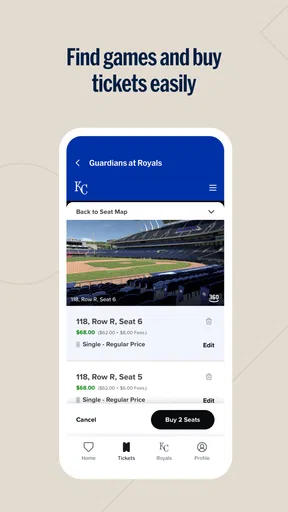
- Mobile ticket access makes entry quick and reduces the need for printed tickets.
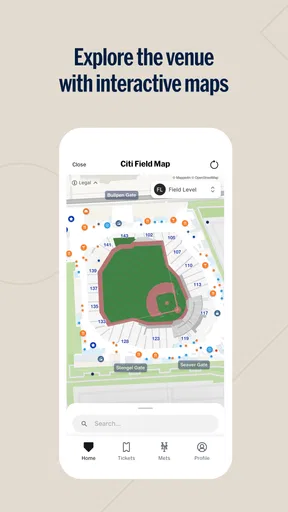
- Interactive stadium maps help locate seats, gates, concessions, and amenities.
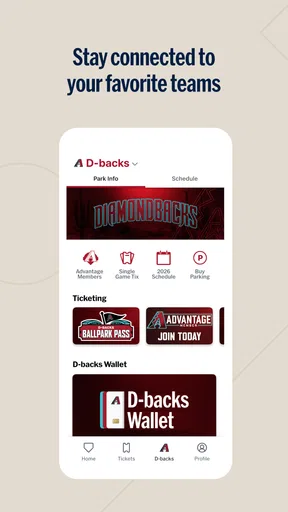
- Team-specific content keeps fans updated with schedules, news, and promotions.
- Ballpark check-ins and badges add a fun reward element for frequent visitors.
- Digital wallet features can organize tickets, passes, and selected stadium offers.
Limitations of MLB Ballpark
- Some features work only at supported MLB stadiums and may vary by team.
- Ticket loading can be unreliable with weak cellular service or crowded networks.
- The app may request location, notification, and account permissions.
- Promotional alerts can become frequent unless notification settings are adjusted.
- Certain offers and rewards may have restrictions, expiration dates, or limited availability.
Other Releases by MLB Advanced Media, L.P.
View All

Similar Picks in This Category
View All
BeSoccer: Soccer Live Score
BeSoccer apps4.3

Cricbuzz - Live Cricket Scores
Cricbuzz.com3.7

NFL
NFL Enterprises LLC2.4

Da Fit
MO YOUNG LIMITED3.6

ESPN
Disney4.5

LiveScore: Live Sports Scores
LiveScore Limited4.5
Frequently Asked Questions
What is MLB Ballpark and what can I do with it?
MLB Ballpark is the official mobile companion for Major League Baseball fans. After signing in or creating an MLB account, you can follow your favorite teams, view schedules and scores, check standings, read news, watch available video content, and receive personalized notifications. The app also provides ballpark-specific information, including maps, events, ticket access, and selected stadium services, depending on the venue and your location.
Can I use MLB Ballpark to access my game tickets?
Yes, MLB Ballpark supports mobile ticket access for many participating teams and stadiums. Tickets purchased through supported MLB or team channels may appear in the app after you sign in with the correct account. You can display barcodes at the entrance, review ticket details, and sometimes transfer tickets to another person. Availability and features vary by team, ticket provider, season, and stadium.
Does MLB Ballpark offer live game streaming?
MLB Ballpark can provide live game information, including scores, play-by-play updates, lineups, statistics, and notifications. However, full live video and audio streaming are generally subject to MLB subscriptions, regional blackout rules, broadcast rights, and your location. Some content may require MLB.TV or another paid service, so downloading the app alone does not guarantee access to every live game.
Is MLB Ballpark free to download and use?
The MLB Ballpark app is generally free to download on Android and iOS, and many basic features—such as schedules, scores, standings, news, and team notifications—can be used without paying. Certain services may involve additional costs, including live streaming subscriptions, premium content, tickets, merchandise, or in-stadium purchases. Mobile data charges may also apply when using the app away from Wi-Fi.
What permissions and account information does MLB Ballpark require?
MLB Ballpark may request access to notifications, location services, Bluetooth or nearby-device features, and camera functions, depending on which tools you use. Location can help identify nearby stadiums or provide venue-related experiences, while notifications deliver score and game alerts. An MLB account may be needed for tickets and personalized features. You can manage many permissions through your device settings, although disabling some may limit functionality.
